
The one thing to get right: only put the NEW children on the sheet you upload
When you upload a koha sheet, Koha Tree adds everyone on that sheet to your project. So the sheet you upload should have only the new children on it — not the ones you've already added.
If you add the new children to your original sheet and upload the whole thing again, every child who was already on it gets uploaded a second time, and you'll end up with duplicates. A fresh sheet with just the new names keeps everything clean.
The easiest way: start from a fresh copy of the template
The simplest approach is to grab a clean copy of the Koha Sheet template and fill in just the new tamariki.
Open the templateThen make it your own in one of two ways:
File > Make a copy — saves a copy into your own Google Drive to work in, or
File > Download — saves a copy to your computer (e.g. as an Excel file).
Either way, you'll have a blank sheet to work from. Add the details for only the new children, and you're ready to upload.
Uploading your new sheet
Head to your project's Project Summary dashboard and use the Add New button to upload the sheet with your new tamariki on it.
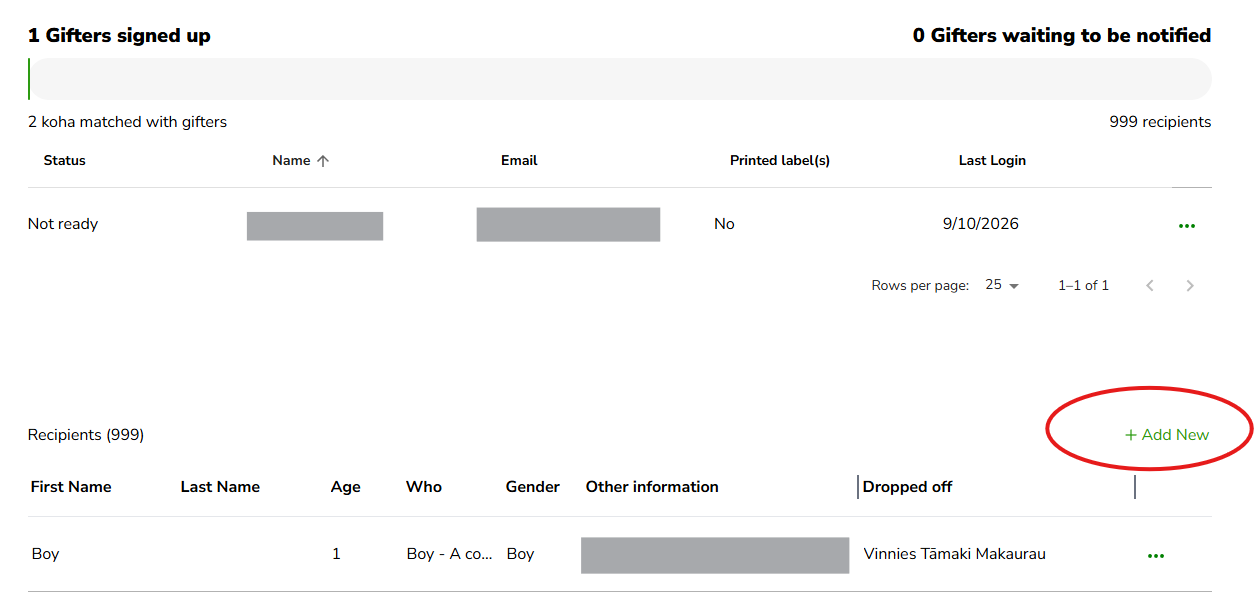
That's it — the new children will be added alongside the ones already there, with no doubling up.
Want to walk through it step by step?
If you'd like more detail, there's a full guide on the learning hub here: Adding extra tamariki or recipients.
Still stuck?
If something's not looking right, kōrero mai — get in touch and we'll help you get it sorted.